
In CELPIP Reading Part 2, Reading to Apply a Diagram, you see a diagram, like a price list, a flyer or a table comparing a few options, next to an email about it. You complete five blanks in the email, then answer three questions. A worry I hear all the time: “there’s so much information in the diagram, I don’t know where to start.” Many students try to read and remember every line of it before they even look at the email.
Even if you’re comfortable with tables and numbers, that approach wastes time, because the diagram stays on the screen the whole time. And if diagrams usually make you nervous, here’s the good news: you don’t need to remember any of it. You only need to know what’s in it, so you can go back and find the right line when the email needs it. In this lesson, we’ll work through one practice set together.
Here’s what we’ll cover:
- Part 2 at a glance
- Skim the diagram: what’s being compared?
- Who is writing, to whom, and why?
- Follow the spotlight through the email
- When you can’t predict the answer
- The last three questions
- The traps in Part 2
- When time is short
Quick answer: Skim the diagram only to see what the options are and what they’re compared on, like price or features. Then find who is writing to whom and why. For each blank, know which option the writer is talking about, read past the blank for clues, and find your answer in the diagram before you look at the options.
1. Part 2 at a glance
| What you read | A diagram on the left (a table, a flyer, a menu, a schedule…) and an email that uses it |
| Questions | 8: five blanks in the email, then three questions about the email |
| How you answer | Each blank and question has a drop-down menu with four options |
| Time | About 9 minutes |
| Scoring | One point for each correct answer. Wrong answers don’t lose points. |
The diagram usually shows a few options of the same kind: four hotels, four ways to travel, four programs. The email is from someone choosing between them.
Here’s the set we’ll use in this lesson:
Read the following diagram and the email about it.
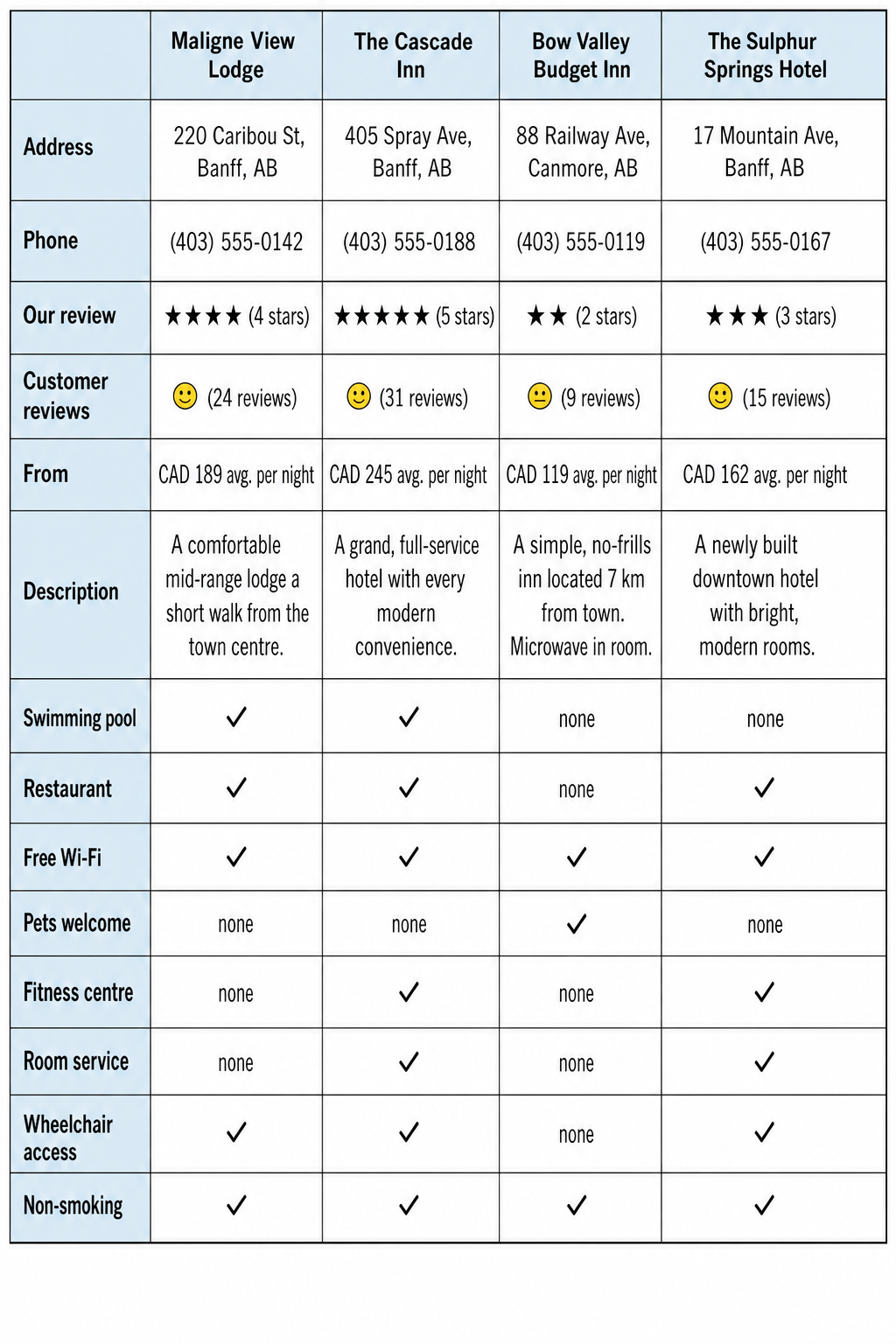 Open full size
Read the following email message about the diagram. Complete the email by choosing the best option for each blank.
Hi Owen,
I've finally scrutinized the accommodation list for Mom's 70th birthday weekend in Banff. Since she's using a wheelchair after her hip surgery, we can forget about 1▾. Her physiotherapist also insists on daily swimming to rebuild her stamina, so a pool is essential. The Cascade Inn would be perfect, but it 2▾, and that's well beyond the $200 a night we budgeted. That leaves 3▾, which is only a brief stroll from downtown, so Mom can browse the shops on Banff Avenue. The one thing she'll miss there is 4▾, because you know how she adores breakfast in bed, but she'll cope. Could you call them at 5▾ to reserve two rooms for May 16 and 17? I'm stuck at the office all day tomorrow and can't make personal calls.
Thanks,
Hannah
2. Skim the diagram: what’s being compared?
Start with the diagram, but don’t read every line. You’d forget most of it before you need it, and it stays on the screen anyway. A quick skim answers just two questions:
- What are the options? Here: four hotels, one per column.
- What are they compared on? Here: address, phone, reviews, price, a short description, and eight facilities like a pool and room service.
Then check yourself. Can you say what the diagram is in one sentence?
This diagram compares four hotels in and near Banff by price, reviews, location and facilities.
That’s all you need before you start. It takes less than a minute.
A few things to notice while you skim:
- Every row or bullet is a feature. A check mark, a price or a short phrase tells you something you may need later.
- Look outside the main table too. Notes in small print, a banner about a sale, or a line in a different colour can hold an answer.
- Pictures can carry information. In a flyer, a photo can show that a product comes in two colours, or that a card is printed on both sides.
3. Who is writing, to whom, and why?
Now go to the email. Before the first blank, find three things, just like in Part 1:
- The writer and the reader: the greeting and the sign-off. Hi Owen… Thanks, Hannah. Mom’s 70th birthday tells you they’re probably brother and sister.
- The purpose: usually in the first sentence. Hannah has looked at the list of hotels for their mom’s birthday weekend.
- The subject line, if there is one. It tells you what the email is about in a few words.
Then read on, and keep a running picture in your head. Here, Hannah gives you her list of needs one by one: wheelchair access, a pool, and less than $200 a night. These needs are how she rules out each hotel, so they’ll lead you to the answers.
4. Follow the spotlight through the email
Here’s a picture I give every student for Part 2. The writer is holding a spotlight and moving it from one option to the next. At every sentence, you need to know which option the spotlight is on. If you fall behind, you’ll look in the wrong column.
For each blank:
- Find which option the sentence is about. The writer often names it. If not, look for clues.
- Read past the blank. The clue is often in what comes after the blank, not before it.
- Find your answer in the diagram before you open the options.
- Then open the options and choose the one that matches.
Blank 1: the option that’s ruled out
Wheelchair access: Maligne View Lodge ✓ · The Cascade Inn ✓ · Bow Valley Budget Inn: none · The Sulphur Springs Hotel ✓
Address: Bow Valley Budget Inn, 88 Railway Ave, Canmore, AB
Since she's using a wheelchair after her hip surgery, we can forget about 1the inn in Canmore▾.
no wheelchair access → Bow Valley
The clue is wheelchair. Which hotel can’t take a wheelchair? The diagram says Bow Valley Budget Inn. Before you open the options, that’s your answer.
Now the options. None of them says Bow Valley. The right one describes it another way: the inn in Canmore, because that’s its address. This happens a lot in Part 2: the answer is in the diagram, but in different words. The other options (the newest hotel, the five-star hotel, the lodge on Caribou Street) all have wheelchair access.
Blank 2: “but” means a problem is coming
From: Maligne View Lodge CAD 189 · The Cascade Inn CAD 245 · Bow Valley Budget Inn CAD 119 · The Sulphur Springs Hotel CAD 162 (avg. per night)
The Cascade Inn would be perfect, but it 2costs the most▾, and that's well beyond the $200 a night we budgeted.
but → a problem
after the blank: price
The spotlight is on The Cascade Inn, and but tells you that a problem is coming. Which problem? Read past the blank: that’s well beyond the $200 a night we budgeted. So it’s about price. The Cascade is CAD 245, the most expensive of the four: it costs the most.
The other options are all problems, but not The Cascade’s. It does have a pool, it’s in town, and it has five stars, not two.
Words that tell you what’s coming next:
| Word or phrase | What it tells you |
|---|---|
| but, however | A problem with the option just mentioned |
| plus, also | Another point in the same direction, often a second problem |
| they both | Find the feature the two options share |
| than I expected | Something surprising, so look for the option that’s different from what you’d guess |
| lastly, that leaves | The one option not discussed yet |
Blank 3: the option that’s left
That leaves ___, which is only a brief stroll from downtown. Bow Valley is out (no wheelchair access), The Cascade is out (too expensive), and Sulphur Springs has no pool. Only one hotel is left: the Maligne View Lodge. The clue after the blank confirms it: the diagram describes it as a short walk from the town centre, and a brief stroll means the same.
Don’t skip sentences without a blank. Her physiotherapist also insists on daily swimming… so a pool is essential has no blank, but it’s the sentence that rules out Sulphur Springs.
5. When you can’t predict the answer
Sometimes you can’t guess the answer before you see the options. Then test every option against the diagram, one by one. Here’s question 8:
Maligne View Lodge: Swimming pool ✓ · Restaurant ✓ · Free Wi-Fi ✓ · Pets welcome: none · Fitness centre: none · Room service: none · Wheelchair access ✓
8. The hotel Hannah has chosen also offers
- a fitness centre.
- pet-friendly rooms.
- a restaurant.
- room service.
check each one in the Maligne column
First, which hotel did Hannah choose? From blank 3: the Maligne View Lodge. Now check each option in its column. Fitness centre: none. Pets: none. Room service: none (and blank 4 already told you she’ll miss it). Restaurant: ✓. The answer is a restaurant.
6. The last three questions
After the email, there are three questions. They test your understanding of the whole email, so the picture you’ve built while filling the blanks does most of the work.
- Keep the names straight. Who’s writing, who’s reading, who’s the email about? Here, it’s Hannah writing to Owen about their mom.
- “Most likely” and “probably” mean the answer isn’t written word for word. You work it out from what the email says. Still, every answer needs evidence in the email.
- Feeling or attitude questions: sort the options into positive and negative, keep the side that matches the email, then choose the one you have evidence for.
- Purpose questions: check the first sentence, and the subject line if there is one. A side detail is not the purpose.
7. The traps in Part 2
| The trap | What it looks like |
|---|---|
| Taken from the diagram, but from the wrong option | For call them at ___, every option is a real phone number from the diagram. Only one is the Maligne’s. |
| A feature the option already has | The Cascade… but it has no swimming pool: it does have one. |
| A feature of a different option | Is outside of town is true of Bow Valley, not The Cascade. |
| The right option, the wrong detail | In blank 2, every option is a problem, but only price fits beyond the $200 a night. |
| Too wide | A discount on all orders, when the diagram says only some items are on sale |
| Made up | An option the diagram never mentions |
In detail: Synonyms, Traps & Checking Your Answer
8. When time is short
- Answer every question. A wrong answer loses nothing.
- Use the spotlight. If you know which option a sentence is about, you can often choose by checking just that column.
- Use the email’s main message for the last three questions.
Practice
Try the questions we haven’t done yet. You’ll need the diagram, so here it is again:
- Read the question. The email is below.
- Your turn: choose an answer for each. Find which hotel the sentence is about, then check the diagram.
- Compare: press Reveal Answers to see the correct answers and why.
When you’re ready, try a full Part 2 set with the timer: Practice Part 2.
Recap: Skim the diagram for the options and what they’re compared on, and don’t try to remember the details. Find who is writing to whom and why. Then follow the spotlight: know which option each sentence is about, read past the blank, and find the answer in the diagram before you open the options. Read every sentence, even the ones without a blank.
Before you move on
- I skim the diagram for the options and what they’re compared on, without memorizing it
- I find who is writing to whom and why before the first blank
- I always know which option the email is talking about
- I read past the blank for clues, and I watch for words like but and that leaves
- I find the answer in the diagram before I open the options
- When I can’t predict, I check each option against the diagram